

Introduction
Obviously you need lights in a world to see anything. Typically, the browser will provide the viewer with some kind of headlight, so they can see what they're looking at. In addition, you will often want to deliberately put lights at specific points in the world. VRML provides three types of light sources for this:
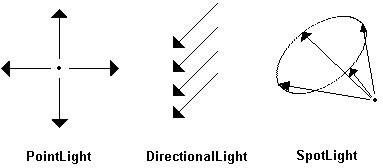
Light sources only affect subsequent objects in the same separator. If you want to apply a transformation to a light source, but still want it to affect later objects, use TransformSeparator instead of Separator.
Each type of light has these properties:
- Color (SFColor) - more here
- Intensity (SFFloat) - 0 off; 1 fully on.
- On (SFBool)
Each type of light source also has it's own additional properties.
PointLight
This kind of light source shines uniformly in all directions, like an unshaded light bulb. It has this property:
- location (SFVec3f) - The point that the rays come from.
Directional Light
A direction light source emits parallel rays which do not diverge or become dimmer with distance, like a laser with an infinitely wide and infinitely thick beam. Typically the headlight is a directional light. It has this property:
- direction (SFVec3f) - All rays are parallel to this vector.
SpotLight
This is a directional light source, where rays originate from a single point. They diverge outward in the shape of a cone, and so become dimmer with distance. These properties are available:
- location (SFVec3f) - The point that the rays originate from.
- direction (SFVec3f) - The direction of the cone's axis.
- cutOffAngle (SFFloat) - The angle at the tip of the cone.
- dropOffRate (SFFloat) - The rate at which light dims with distance.
